36 posts tagged with "edge computing"

View All Tags

· 9 min read

This post shares a hands-on validation of KubeEdge on a real RISC-V board, VisionFive2. It covers dependency preparation, native build of KubeEdge components, edge node join, and basic workload deployment, showing that the core deployment path is feasible on riscv64.

As the RISC-V ecosystem continues to grow, more edge scenarios are beginning to care about multi-architecture support. For KubeEdge, an important question naturally follows: can its basic deployment path work on a real RISC-V device?

Recently, I did a hands-on validation on a VisionFive2 board to answer that question.

The goal of this work was not to prove production readiness in one step, but to verify a more practical baseline: on a real riscv64 environment, can we complete the core path from dependency preparation, to KubeEdge component build, to edge node join, and finally to basic workload running?

The answer, at least for this round of testing, is yes.


Why this validation matters

As edge computing expands to more hardware forms, architecture diversity is becoming increasingly common. In that context, verifying KubeEdge on RISC-V is meaningful in two ways.

First, it helps clarify whether KubeEdge has a usable starting point on emerging architectures. Second, it provides a practical reference for follow-up work, including workload compatibility testing, networking validation, and long-term stability evaluation on real devices.

For this validation, I used VisionFive2 as the target platform and focused on a single question: is the basic deployment chain of KubeEdge on RISC-V feasible?

More specifically, I wanted to verify the following:

  • whether edge-side dependencies can be installed and used on riscv64;
  • whether edgecore and keadm can be built successfully on the device;
  • whether the edge node can join CloudCore successfully;
  • whether a basic containerized workload can finally run on the edge side.

Test environment

Hardware

  • Board: VisionFive2
  • CPU Architecture: RISC-V 64-bit
  • SoC: JH7110

Operating system

  • OS: Ubuntu Server 24.04.4
  • Architecture: riscv64
  • Image:
https://cdimage.ubuntu.com/releases/24.04.4/release/ubuntu-24.04.4-preinstalled-server-riscv64+jh7110.img.xz
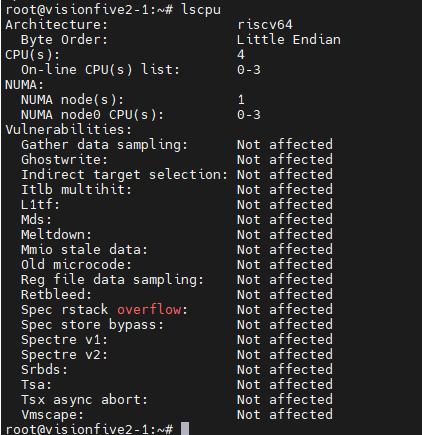
Ubuntu image on VisionFive2

Software versions

  • containerd: v2.2.2
  • runc: installed via apt
  • crictl: v1.35.0
  • CNI plugins: v1.9.1
  • nerdctl: v2.2.2
  • buildkit: v0.28.1
  • Go: v1.22.4
  • KubeEdge: v1.21.0

What was validated

This round of work was intentionally scoped as a basic capability validation, not a full production-readiness assessment.

The validation covered:

  • base OS and dependency preparation;
  • container runtime setup;
  • KubeEdge core component build;
  • edge node join;
  • basic application deployment.

The following items are not fully covered yet:

  • multiple workload types and replicas;
  • Service, DNS, and deeper CNI/networking verification;
  • disconnect/reconnect and fault recovery scenarios;
  • long-duration stability evaluation;
  • compatibility across more RISC-V boards or distributions.

Step 1: Preparing the container runtime environment

Before bringing up KubeEdge, the first task was to prepare the edge-side runtime stack on VisionFive2. This included installing and configuring runc, containerd, crictl, CNI plugins, nerdctl, and buildkit.

A few adjustments were also needed during this step, especially around containerd cgroup configuration and the pause image used by the runtime.

Install runc and containerd

sudo apt update && sudo apt install -y runc

wget https://github.com/containerd/containerd/releases/download/v2.2.2/containerd-2.2.2-linux-riscv64.tar.gz
sudo tar Cxzvf /usr/local containerd-2.2.2-linux-riscv64.tar.gz

sudo curl -L https://raw.githubusercontent.com/containerd/containerd/v2.2.2/containerd.service -o /etc/systemd/system/containerd.service

sudo mkdir -p /etc/containerd
containerd config default | sudo tee /etc/containerd/config.toml

sudo sed -i 's/SystemdCgroup = false/SystemdCgroup = true/' /etc/containerd/config.toml
sudo sed -i 's#sandbox_image = ".*"#sandbox_image = "registry.k8s.io/pause:3.9"#' /etc/containerd/config.toml

sudo systemctl daemon-reload
sudo systemctl enable --now containerd

Install crictl

wget https://github.com/kubernetes-sigs/cri-tools/releases/download/v1.35.0/crictl-v1.35.0-linux-riscv64.tar.gz
sudo tar xzvf crictl-v1.35.0-linux-riscv64.tar.gz -C /usr/local/bin

sudo tee /etc/crictl.yaml <<EOF
runtime-endpoint: unix:///run/containerd/containerd.sock
image-endpoint: unix:///run/containerd/containerd.sock
timeout: 10
debug: false
EOF

Install CNI plugins

wget https://github.com/containernetworking/plugins/releases/download/v1.9.1/cni-plugins-linux-riscv64-v1.9.1.tgz
sudo mkdir -p /opt/cni/bin
sudo tar Cxzvf /opt/cni/bin cni-plugins-linux-riscv64-v1.9.1.tgz

sudo mkdir -p /etc/cni/net.d
sudo chmod 755 /etc/cni /etc/cni/net.d
sudo tee /etc/cni/net.d/87-loopback.conf <<EOF
{
"cniVersion": "0.3.1",
"name": "lo",
"type": "loopback"
}
EOF

Install nerdctl and buildkit

wget https://github.com/containerd/nerdctl/releases/download/v2.2.2/nerdctl-2.2.2-linux-riscv64.tar.gz
sudo tar Cxzvvf /usr/local/bin nerdctl-2.2.2-linux-riscv64.tar.gz

wget https://github.com/moby/buildkit/releases/download/v0.28.1/buildkit-v0.28.1.linux-riscv64.tar.gz
sudo tar Cxzvvf /usr/local buildkit-v0.28.1.linux-riscv64.tar.gz

sudo tee /etc/systemd/system/buildkitd.service <<EOF
[Unit]
Description=BuildKit Daemon (containerd worker)
Documentation=https://github.com/moby/buildkit
After=containerd.service
Requires=containerd.service

[Service]
Type=notify
ExecStart=/usr/local/bin/buildkitd --oci-worker=false --containerd-worker=true --containerd-worker-namespace=k8s.io --containerd-worker-addr=/run/containerd/containerd.sock
Restart=always
User=root
Group=root
LimitNOFILE=65535

[Install]
WantedBy=multi-user.target
EOF

sudo systemctl daemon-reload
sudo systemctl enable --now buildkitd

At this point, the basic runtime environment required by the edge node was in place.


Step 2: Building a RISC-V-compatible pause image

One practical issue during setup was the pause image.

To make the runtime path more controllable on the current environment, I manually built a RISC-V-compatible pause:3.9 image and loaded it into the local containerd namespace used by KubeEdge.

mkdir -p pause-build/bin
cd pause-build

curl -LO https://raw.githubusercontent.com/kubernetes/kubernetes/v1.28.0/build/pause/linux/pause.c
sudo apt install -y gcc
gcc -Os -Wall -Wextra -static -o bin/pause-riscv64 pause.c

tee Dockerfile <<EOF
FROM scratch
ARG ARCH=riscv64
ADD bin/pause-${ARCH} /pause
ENTRYPOINT ["/pause"]
EOF

sudo nerdctl -n k8s.io build -t registry.k8s.io/pause:3.9 .

This step helped ensure that later workload creation would not be blocked by image compatibility issues.


Step 3: Building KubeEdge components on riscv64

After preparing the runtime layer, the next key question was whether KubeEdge itself could be built successfully on the device.

For this validation, I focused on the two most relevant binaries for the edge-side path: edgecore and keadm.

Install Go

wget https://mirrors.aliyun.com/golang/go1.22.4.linux-riscv64.tar.gz
sudo tar -C /usr/local -xzf go1.22.4.linux-riscv64.tar.gz

echo "export PATH=\$PATH:/usr/local/go/bin" >> ~/.bashrc
source ~/.bashrc
go version

Clone source and build edgecore / keadm

git clone https://github.com/kubeedge/kubeedge.git
cd kubeedge
git checkout v1.21.0

GIT_VERSION=$(git describe --tags --abbrev=0 || echo "v0.0.0-master")
GIT_COMMIT=$(git rev-parse --short HEAD)
GIT_TREE_STATE=$(if git status --porcelain | grep -q .; then echo "dirty"; else echo "clean"; fi)
BUILD_DATE=$(date -u +'%Y-%m-%dT%H:%M:%SZ')

LDFLAGS="-X github.com/kubeedge/kubeedge/pkg/version.gitVersion=${GIT_VERSION} \
-X github.com/kubeedge/kubeedge/pkg/version.gitCommit=${GIT_COMMIT} \
-X github.com/kubeedge/kubeedge/pkg/version.gitTreeState=${GIT_TREE_STATE} \
-X github.com/kubeedge/kubeedge/pkg/version.buildDate=${BUILD_DATE} \
-s -w"

GOARCH=riscv64 go build -ldflags "${LDFLAGS}" -o edgecore-riscv64 ./edge/cmd/edgecore
GOARCH=riscv64 go build -ldflags "${LDFLAGS}" -o keadm-riscv64 ./keadm/cmd/keadm/

sudo cp keadm-riscv64 /usr/local/bin/keadm

The build completed successfully, which is an important result on its own: KubeEdge core components can at least be built natively on this RISC-V platform under the tested version path.


Step 4: Packaging the installation artifact

To make follow-up deployment and reproduction easier, I also packaged the built edgecore binary into an installation image.

mkdir -p install/usr/local/bin/
cp edgecore-riscv64 install/usr/local/bin/edgecore
cd install
tar zcvf kubeedge-v1.21.0-linux-riscv64.tar.gz usr/

tee Dockerfile <<EOF
FROM busybox:stable
ADD kubeedge-v1.21.0-linux-riscv64.tar.gz /
CMD ["sh"]
EOF

sudo nerdctl -n k8s.io build -t docker.io/kubeedge/installation-package:v1.21.0 .

This is not the final goal of the validation itself, but it is useful for later migration, distribution, and repeatability.


Step 5: Joining the edge node to CloudCore

Once dependencies and binaries were ready, I used keadm join to connect the VisionFive2 node to the cloud side.

This is the key step that determines whether the cloud-edge connection path can actually work on RISC-V.

sudo keadm join \
--cgroupdriver=systemd \
--cloudcore-ipport=<CLOUDCORE_IP>:30000 \
--hub-protocol=websocket \
--certport=30002 \
--kubeedge-version=v1.21.0 \
--remote-runtime-endpoint=unix:///run/containerd/containerd.sock \
--edgenode-name=vf2-2 \
--set modules.edgeStream.server=<CLOUDCORE_IP>:30004,modules.edgeStream.enable=true,modules.metaManager.enable=true,modules.metaManager.metaServer.enable=true,modules.eventBus.enable=false,modules.serviceBus.enable=true,modules.edgeHub.websocket.server=<CLOUDCORE_IP>:30000 \
--token=<TOKEN>


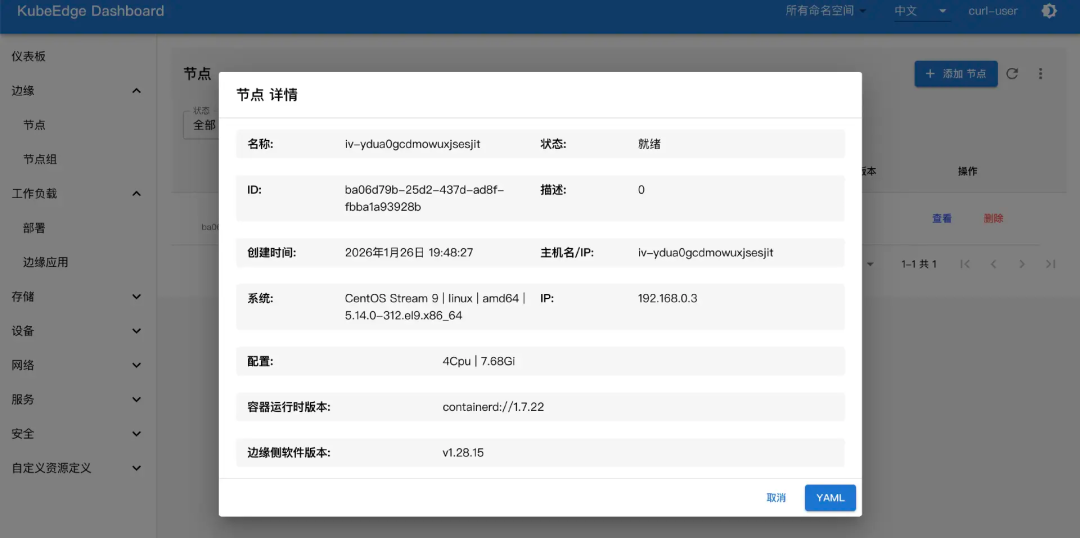
Node join result Edge node status

After execution, the edge node joined successfully and the node status was normal.

This means the main join path between the RISC-V edge node and CloudCore was successfully verified.


Step 6: Running a basic workload on the edge node

Joining the node is only part of the story. To complete the full loop, the environment still needs to prove that it can actually run a real workload.

For this, I deployed a simple Nginx application to the edge node.

tee edgetest.yaml <<EOF
apiVersion: apps/v1
kind: Deployment
metadata:
name: nginx-edge
spec:
replicas: 1
selector:
matchLabels:
app: nginx-edge
template:
metadata:
labels:
app: nginx-edge
spec:
nodeName: vf2-2
hostNetwork: true
automountServiceAccountToken: false
containers:
- name: nginx-edge
image: nginx
imagePullPolicy: IfNotPresent
ports:
- containerPort: 80
EOF

kubectl apply -f edgetest.yaml

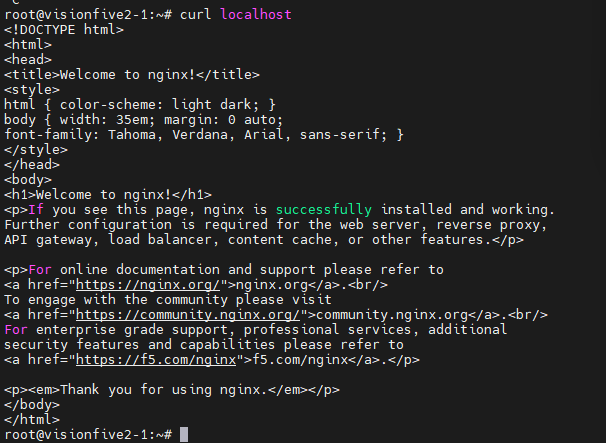
Nginx deployment result Nginx running on edge node

The deployment was created successfully and the container ran on the edge side as expected.

At this point, the core validation loop had been closed:

  • dependencies were prepared;
  • KubeEdge components were built;
  • the node joined CloudCore;
  • a basic workload ran successfully on the edge device.

What this validation tells us

Based on the observed results, the following conclusions can be drawn for the current stage.

1. Edge-side dependencies can be installed on VisionFive2

The basic runtime stack — including containerd, runc, crictl, CNI plugins, nerdctl, and buildkit — can be installed and configured successfully on Ubuntu 24.04.4 riscv64 running on VisionFive2.

2. KubeEdge core components can be built on riscv64

Both edgecore and keadm were successfully compiled on the tested RISC-V environment, showing that KubeEdge has a workable source-level build path on this platform.

3. The edge node can join CloudCore successfully

Using keadm join, the VisionFive2 node was able to join the cloud side and report normal status, which confirms that the basic cloud-edge access path is feasible on RISC-V.

4. Basic workloads can run on the edge side

The successful deployment of Nginx shows that this environment is not only able to build and connect, but also able to support basic containerized workloads.


Final takeaway

From this round of validation, I would summarize the current state in three words:

  • buildable;
  • joinable;
  • runnable.

In other words, KubeEdge already demonstrates basic usability on VisionFive2 under the tested RISC-V environment.

That does not mean the platform is fully validated for all edge scenarios yet. But it does mean that the most important first step has been crossed: the core deployment path works.

For anyone interested in bringing KubeEdge to RISC-V devices, this should be a useful starting point.


Current limitations and next steps

It is also important to keep the conclusion within the right boundary.

This validation proves basic feasibility, not full production readiness.

Several areas still need follow-up work:

  • broader workload compatibility testing;
  • systematic verification of networking features such as Service, DNS, and deeper CNI behavior;
  • disconnection, reconnection, and recovery testing;
  • long-duration stability observation on real hardware;
  • validation across more RISC-V boards and software combinations.

These will be the more meaningful next steps if we want to move from “it works” to “it is reliable enough for real-world edge scenarios.”


Conclusion

This validation on VisionFive2 shows that KubeEdge v1.21.0 can complete the basic end-to-end deployment path on Ubuntu 24.04.4 riscv64:

  • the runtime environment can be prepared;
  • core components can be built;
  • the edge node can join the cloud side;
  • a basic workload can run successfully.

For the RISC-V ecosystem, this is a small but concrete step forward.

And for KubeEdge on emerging architectures, it provides a practical reference point for deeper verification work ahead.

· 4 min read

On March 11, 2026, KubeEdge released v1.23.0

1.23 What's New

Release Highlights

Enhanced Capabilities of EdgeCore and Keadm Under Windows Operating System

In version 1.23.0, we have enhanced the capabilities of EdgeCore and keadm on Windows OS as follows:

  • Local DMI service is provided : Since Windows does not support Unix Domain Sockets, we use Windows Named Pipes to implement local network communication;
  • Enhanced keadm upgrade/download : In v1.23.0, keadm will detect the version information of the local edgecore.exe . If a higher version is available, it will automatically download the EdgeCore package again to avoid the upgrade being skipped because edgecore.exe already exists locally.
  • Enhanced observability : In the new version, EdgeCore logs will be redirected to configurable log files, optimizing operations and troubleshooting in Windows environments.

Refer to the link for more details.(#6563, #6580, #6565)

Add Equipment Anomaly Detection Capability

v1.23.0 introduced a device anomaly detection framework, allowing you to specify anomaly detection configurations in the pushMethod field of the Device CRD:

apiVersion: devices.kubeedge.io/v1beta1

kind: Device

spec:

properties:

pushMethod:

anomolyDetection:

... // 指定异常检测字段,如设备工作状态等
...

We've also implemented device anomaly detection and processing logic in the Mapper, allowing you to customize the handling of abnormal device data. Additionally, we've provided a device anomaly detection demo in the Example repository, making it easy for you to quickly understand and try out this new capability. See details: https://github.com/kubeedge/examples/pull/163

Refer to the link for more details.(#6478, #6543)

Optimize Edge-Side Query Node Process to Reduce Edge-Cloud Channel Bandwidth Usage

In previous versions, EdgeCore needed to remotely query node information via the edge-cloud channel, which resulted in significant bandwidth consumption, especially in large-scale scenarios. In the new version, EdgeCore queries nodes directly from the edge database. Simultaneously, CloudCore automatically synchronizes node information to the edge database when it detects updates, significantly improving system performance and reliability in large-scale edge scenarios.

Refer to the link for more details.(#6543)

Replace Beego with Gorm and Refactor Edge Database

The original edge database used the Beego framework, which only utilized the ORM portion. In the new version, we replace the Beego framework with the lighter Gorm. Simultaneously, the edge database has been restructured, introducing a unified database operation entry point in MetaManager, making database interactions clearer and easier to maintain.

Refer to the link for more details.(#6296, #6585)

Upgrade Kubernetes Dependency to v1.32

The new version upgrades the Kubernetes version it depends on to v1.32.10, allowing you to use the new version's features in the cloud and at the edge.

Refer to the link for more details.(#6549)

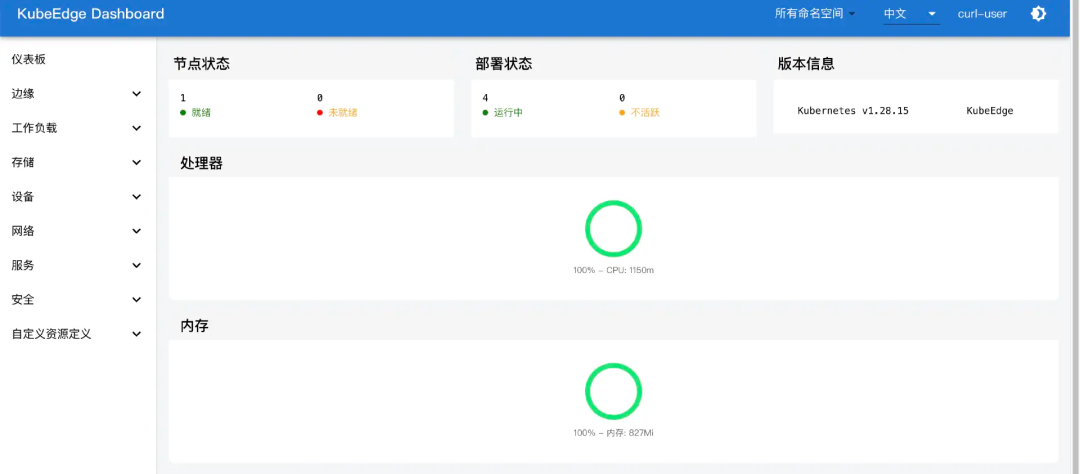
New Dashboard Version: Support Chinese Internationalization, Performance Optimization and Page Improvement

Dashboard v0.2.0 has been officially released, including the following updates:

  • Introducing the Backend-for-Frontend (BFF) architecture establishes a data processing middleware layer, optimizes data processing logic, and improves frontend performance;
  • An internationalized language framework has been introduced, and Chinese language pack support has been added.
  • We have comprehensively optimized the Dashboard's UI experience, unified the page style, and focused on optimizing form components such as PodTable and TableView to improve the user interaction experience.

Refer to the link for more details.(#v0.2.0)

Version upgrade notes

Starting with version 1.23.0, the Status field of the Device CRD will be separated and used as a separate DeviceStatus CRD . This change is compatible with older CRDs, but please note that in later versions, device status will need to be obtained through the new DeviceStatus CRD .

Refer to the link for more details.(#6534)

· 4 min read

On Nov 4, 2025, KubeEdge released v1.22.

1.22 What's New

Release Highlights

Add Hold/Release Mechanism for Controlling Edge Resource Updates

In applications such as autonomous driving, drones, and robotics, we want to control when updates to edge resources occur, ensuring that these resources cannot be updated without the permission of the edge administrator. In v1.22.0, we introduced a hold/release mechanism to control updates to edge resources.

On the cloud side, users can indicate that the corresponding Pod should be held on the edge by adding the annotation edge.kubeedge.io/hold-upgrade: "true" to resources like Deployment, StatefulSet, and DaemonSet.

On the edge, Pods marked with edge.kubeedge.io/hold-upgrade: "true" will be temporarily held and not processed. Edge administrators can release the lock on the Pod to complete the resource update by executing the following command:

keadm ctl unhold-upgrade pod <pod-name>

Alternatively, they can execute the following command to unlock all held edge resources on the edge node:

keadm ctl unhold-upgrade node
note

Using the keadm ctl command requires the DynamicController and MetaServer switches to be enabled.

Refer to the link for more details.(#6348, #6418)

Beehive Framework Upgrade, Supporting Configurable Submodule Restart Policies

In release 1.17, we implemented auto-restart for the EdgeCore modules, allowing global configuration of edge modules restarts. In release 1.22, we optimized the Beehive framework to support restart policy configurations for edge submodules. We also standardized the error handling for starting Beehive submodules.

Refer to the link for more details.(#6444, #6445)

Device Model Update Based On Thing Model and Product Concept

The current Device Model is designed based on the thing model concept. In traditional IoT, devices are usually designed with a three-tier structure: thing model, product, and device instance, which can lead to user confusion during actual use.

In release 1.22, we upgraded the device model design by integrating the concepts of thing models and actual products. We extracted the protocolConfigData and visitors fields from existing device instances into the device model, allowing device instances to share these model configurations. Additionally, to reduce the cost of separating models, device instances can override these configurations.

Refer to the link for more details.(#6457, #6458)

Add Featuregates for Pod Resources Server and CSI Plugin in EdgeCore Integrated Lightweight Kubelet

In previous versions, we removed the Pod Resources Server capability from the integrated lightweight Kubelet in EdgeCore. However, in some use cases, users wish to restore this capability for monitoring Pods. Additionally, the default activation of the CSI Plugin in Kubelet can lead to failures in offline environments due to failed CSINode creation when starting EdgeCore.

In v1.22.0, we added featuregates for the Pod Resources Server and CSI Plugin in the lightweight Kubelet. If you need to enable the Pod Resources Server or disable the CSI Plugin, you can add the following feature gates to your EdgeCore configuration:

apiVersion: edgecore.config.kubeedge.io/v1alpha2
kind: EdgeCore
modules:
edged:
tailoredKubeletConfig:
featureGates:
KubeletPodResources: true
DisableCSIVolumePlugin: true
...

Refer to the link for more details.(kubeedge/kubernetes#12, kubeedge/kubernetes#13, #6452)

C language Mapper-Framework Support

In v1.20.0, we added a Java version of the Mapper-Framework based on the existing Go language version. Due to the diversity of communication protocols for edge IoT devices, many edge device driver protocols are implemented in C. Thus, in the new release, KubeEdge offers a C language version of the Mapper-Framework. Users can access the feature-multilingual-mapper-c branch in the KubeEdge main repository to generate custom Mapper projects in C using the Mapper Framework.

Refer to the link for more details.(#6405, #6455)

Upgrade Kubernetes Dependency to v1.31.12

Upgrade the vendored kubernetes version to v1.31.12, users are now able to use the feature of new version on the cloud and on the edge side.

Refer to the link for more details.(#6443)

· 4 min read

On June 28, 2025, KubeEdge released v1.21.

1.21 What's New

Release Highlights

New Generation Node Task API and Implementation

In v1.21, we redesigned the status structure and operation process of node jobs to track error information and facilitate developers' understanding. In the new design, the node job status includes Phase (Init, InProgress, Completed, Failure) and nodeStatus. The nodeStatus consists of Phase (Pending, InProgress, Successful, Failure, Unknown), actionFlow, nodeName, reason, and business-related fields. A YAML example of the NodeUpgradeJob status is provided below.

status:
nodeStatus:
- actionFlow:
- action: Check
status: 'True'
time: '2025-05-28T08:12:01Z'
- action: WaitingConfirmation
status: 'True'
time: '2025-05-28T08:12:01Z'
- action: Backup
status: 'True'
time: '2025-05-28T08:12:01Z'
- action: Upgrade
status: 'True'
time: '2025-05-28T08:13:02Z'
currentVersion: v1.21.0
historicVersion: v1.20.0
nodeName: ubuntu
phase: Successful
phase: Completed

Refer to the link for more details.(#6082, #6084)

Support Closed Loop Flow Control

In v1.21, we have optimized the traffic closed-loop function of node groups. Applications within a node group can only access application services within the same group and unable to access services of other node groups. With this mechanism, users can easily achieve network isolation between multiple edge regions, ensuring that application services in different regions do not interfere with each other.

Refer to the link for more details.(#6097, #6077)

Support Update Edge Configuration from Cloud

In many cases, cloud-based direct updates to EdgeCore configuration files for edge nodes offer greater convenience than manual updates from edge node, especially for batch operations that boost efficiency by managing multiple nodes simultaneously.

In v1.21.0, ConfigUpdateJob CRD is introduced to allows users to update configuration files for edge nodes in the cloud. The updateFields within the CRD is used to specify the configuration items that need to be updated.

CRD Sample:

apiVersion: operations.kubeedge.io/v1alpha2
kind: ConfigUpdateJob
metadata:
name: configupdate-test
spec:
failureTolerate: "0.3"
concurrency: 1
timeoutSeconds: 180
updateFields:
modules.edgeStream.enable: "true"
labelSelector:
matchLabels:
"node-role.kubernetes.io/edge": ""
node-role.kubernetes.io/agent: ""
note
  • This feature is disabled by default in v1.21.0. To enable it, please start the ControllerManager and TaskManager at cloud, as well as the TaskManager edge.
  • Updating edge configurations will require a restart of EdgeCore.

Refer to the link for more details.(#6338)

Support One-Click Deployment of Dashboard and Integration of kubeedge/keink

In v1.21, the dashboard functionality has been enhanced by designing a BFF (Backend for Frontend) layer to connect the frontend user interface layer with the KubeEdge backend API. Additionally, the dashboard is integrated with the keink project, allowing users to launch a keink cluster in the dashboard environment with just one command to experience KubeEdge features.

Refer to the link for more details.(#50)

Important Steps before Upgrading

  • From v1.21, the v1alpha2 node job enables by default, and the CRD definition will be backward compatible. If you want to continue to use the v1alpha1 version of the NodeUpgradeJob and ImagePrePullJob, please setting the feature gates of ControllerManager and CloudCore.
    • Add a command arg for ControllerManager:
      --feature-gates=disableNodeTaskV1alpha2
    • Modify the CloudCore configuration:
      apiVersion: cloudcore.config.kubeedge.io/v1alpha2
      kind: CloudCore
      featureGates:
      disableNodeTaskV1alpha2: true
      ...
note

The node job v1alpha2 CRDs are compatible with v1alpha1, but they cannot be switched between them. The code logic of v1alpha1 will destroy the data of v1alpha2 node job CR.

The v1alpha1 node jobs will no longer be maintained, and relevant codes will be clean up after v1.23. In addition, the node job has become a default disabled Beehive module in EdgeCore. If you want to use the node jobs, please modify the edgecore.yaml to enable it.

  modules:
...
taskManager:
enable: true
  • From v1.21, keadm upgrade related commands(backup, upgrade, rollback) at the edge have been adjusted.
    • The upgrade command will not automatically execute the backup. The backup command needs to be triggered manually.
    • The upgrade command hides business-related flags and relevant codes will be cleaned up after v1.23.
    • All upgrade related commands use level 3 commands:
    keadm edge upgrade
    keadm edge backup
    keadm edge rollback

· 6 min read

On January 21, 2025, KubeEdge released v1.20. The new release has enhanced the capabilities of managing and operating edge nodes and applications for large-scale, offline and other edge scenarios. At the same time, it has added support for the multi-language Mapper-Framework.

1.20 What's New

Release Highlights

Support Batch Node Process

Previously, the keadm tool of KubeEdge only supports manual single-node management. However, in edge scenarios, the scale of nodes is often very large, and the management process of a single node can no longer cope with such large-scale scenarios.

In v1.20, we have provided the batch node operation and maintenance capability. With this capability, users only need to use one configuration file to perform batch operation and maintenance on all edge nodes through a control node (which can log in to all edge nodes). The supported operation and maintenance capabilities include join, reset, and upgrade.

# Configuration Requirements
keadm:
download:
enable: true # <Optional> Whether to download the keadm package, which can be left unconfigured, default is true. if it is false, the 'offlinePackageDir' will be used.
url: "" # <Optional> The download address of the keadm package, which can be left unconfigured. If this parameter is not configured, the official github repository will be used by default.
keadmVersion: "" # <Required> The version of keadm to be installed. for example: v1.19.0
archGroup: # <Required> This parameter can configure one or more of amd64/arm64/arm.
- amd64
offlinePackageDir: "" # <Optional> The path of the offline package. When download.enable is true, this parameter can be left unconfigured.
cmdTplArgs: # <Optional> This parameter is the execution command template, which can be optionally configured and used in conjunction with nodes[x].keadmCmd.
cmd: "" # This is an example parameter, which can be used in conjunction with nodes[x].keadmCmd.
token: "" # This is an example parameter, which can be used in conjunction with nodes[x].keadmCmd.
nodes:
- nodeName: edge-node # <Required> Unique name, used to identify the node
arch: amd64 # <Required> The architecture of the node, which can be configured as amd64/arm64/arm
keadmCmd: "" # <Required> The command to be executed on the node, can used in conjunction with keadm.cmdTplArgs. for example: "{{.cmd}} --edgenode-name=containerd-node1 --token={{.token}}"
copyFrom: "" # <Optional> The path of the file to be copied from the local machine to the node, which can be left unconfigured.
ssh:
ip: "" # <Required> The IP address of the node.
username: root # <Required> The username of the node, need administrator permissions.
port: 22 # <Optional> The port number of the node, the default is 22.
auth: # Log in to the node with a private key or password, only one of them can be configured.
type: password # <Required> The value can be configured as 'password' or 'privateKey'.
passwordAuth: # It can be configured as 'passwordAuth' or 'privateKeyAuth'.
password: "" # <Required> The key can be configured as 'password' or 'privateKeyPath'.
maxRunNum: 5 # <Optional> The maximum number of concurrent executions, which can be left unconfigured. The default is 5.`

# Configuration Example
keadm:
download:
enable: true
url: https://github.com/kubeedge/kubeedge/releases/download/v1.20.0 # If this parameter is not configured, the official github repository will be used by default
keadmVersion: v1.20.0
archGroup: # This parameter can configure one or more of amd64\arm64\arm
- amd64
offlinePackageDir: /tmp/kubeedge/keadm/package/amd64 # When download.enable is true, this parameter can be left unconfigured
cmdTplArgs: # This parameter is the execution command template, which can be optionally configured and used in conjunction with nodes[x].keadmCmd
cmd: join --cgroupdriver=cgroupfs --cloudcore-ipport=192.168.1.102:10000 --hub-protocol=websocket --certport=10002 --image-repository=docker.m.daocloud.io/kubeedge --kubeedge-version=v1.20.0 --remote-runtime-endpoint=unix:///run/containerd/containerd.sock
token: xxx
nodes:
- nodeName: ubuntu1 # Unique name
arch: amd64
keadmCmd: '{{.cmd}} --edgenode-name=containerd-node1 --token={{.token}}' # Used in conjunction with keadm.cmdTplArgs
copyFrom: /root/test-keadm-batchjoin # The file directory that needs to be remotely accessed to the joining node
ssh:
ip: 192.168.1.103
username: root
auth:
type: privateKey # Log in to the node using a private key
privateKeyAuth:
privateKeyPath: /root/ssh/id_rsa
- nodeName: ubuntu2
arch: amd64
keadmCmd: join --edgenode-name=containerd-node2 --cgroupdriver=cgroupfs --cloudcore-ipport=192.168.1.102:10000 --hub-protocol=websocket --certport=10002 --image-repository=docker.m.daocloud.io/kubeedge --kubeedge-version=v1.20.0 --remote-runtime-endpoint=unix:///run/containerd/containerd.sock # Used alone
copyFrom: /root/test-keadm-batchjoin
ssh:
ip: 192.168.1.104
username: root
auth:
type: password
passwordAuth:
password: *****
maxRunNum: 5

# Usage
keadm batch -c config.yaml

Refer to the link for more details.(#5988, #5968)

Multi-language Mapper-Framework Support

To further reduce the complexity of developing custom Mapper, in this version, KubeEdge provides the Java version of Mapper-Framework. Users can access the KubeEdge feature-multilingual-mapper branch to use Mapper-Framework to generate a Java version of custom Mapper project.

Refer to the link for more details.(#5773, #5900)

Support Pods logs/exec/describe and Devices get/edit/describe Operation at Edge Using keadm ctl

In v1.17, a new command keadm ctl has been introduced to support pods query and restart at Edge. In this release, keadm ctl supports more functionality including pod logs/exec/describe and device get/edit/describe to help users operate resources at edge, especially in offline scenarios.

[root@edgenode1 ~]# keadm ctl -h
Commands operating on the data plane at edge

Usage:
keadm ctl [command]

Available Commands:
...
describe Show details of a specific resource
edit Edit a specific resource
exec Execute command in edge pod
get Get resources in edge node
logs Get pod logs in edge node
...

Refer to the link for more details.(#5752, #5901)

Decouple EdgeApplications from NodeGroups, Support Node Label Selector

EdgeApplication can be overrides deployment spec(i.e. replicas, image, commands and environments) via the node group, and pod traffics are closed-loop in a node group(Deployments managed by EdgeApplication share a Service). But in the real scenario, the scope of nodes that need batch operations is different from that of nodes that need to collaborate with each other.

We add a new targetNodeLabels field for node label selectors in the EdgeApplication CRD, this field will allow the application to deploy based on node labels and apply overrides specific to those nodes.

apiVersion: apps.kubeedge.io/v1alpha1
kind: EdgeApplication
metadata:
name: edge-app
namespace: default
spec:
replicas: 3
image: my-app-image:latest
# New field: targetNodeLabels
targetNodeLabels:
- labelSelector:
- matchExpressions:
- key: "region"
operator: In
values:
- "HangZhou"
overriders:
containerImage:
name: new-image:latest
resources:
limits:
cpu: "500m"
memory: "128Mi"

Refer to the link for more details.(#5755, #5845)

CloudHub-EdgeHub Supports IPv6

We provide a configuration guide in the documentation on the official website, which is how KubeEdge enables the cloud-edge hub to support IPv6 in a K8s cluster.

Refer to the document https://kubeedge.io/docs/advanced/support_ipv6

Upgrade Kubernetes Dependency to v1.30.7

Upgrade the vendered kubernetes version to v1.30.7, users are now able to use the feature of new version on the cloud and on the edge side.

Refer to the link for more details. (#5997)

Important Steps before Upgrading

  • From v1.20, the default value for the EdgeCore configuration option edged.rootDirectory will change from /var/lib/edged to /var/lib/kubelet. If you wish to continue using the original path, you can set --set edged.rootDirectory=/var/lib/edged when installing EdgeCore with keadm.